Java's "Write Once, Run Anywhere" principle is foundational to its sustained popularity. This portability is powered by the Java Virtual Machine (JVM), specifically its sophisticated system of ClassLoaders and dynamic class-loading mechanisms. Understanding these components can greatly improve your insight into Java's runtime behaviour and performance characteristics.
Let's explore step-by-step how Java transforms your code into executable functionality.
What are Java ClassLoaders?
A Java ClassLoader is responsible for dynamically loading Java classes into the JVM at runtime. When the JVM requires a class, it's the ClassLoader's task to locate the class definition (typically a .class file) and load it into memory.
Java uses a hierarchical ClassLoader structure composed of three built-in loaders:
-
Bootstrap ClassLoader:
- The root ClassLoader, implemented in native code.
- Loads Java's core API classes from
JAVA_HOME/lib(e.g.,rt.jar,tools.jar).
-
Platform ClassLoader (formerly Extension ClassLoader):
- Loads extension classes from
JAVA_HOME/lib/extor directories specified by thejava.ext.dirsproperty. - Typically handles classes prefixed with
javax.*.
- Loads extension classes from
-
Application ClassLoader (System ClassLoader):
- Loads classes specified by the application's classpath (
CLASSPATHor-cpoption). - Handles application-level classes and JARs.
- Loads classes specified by the application's classpath (
The ClassLoader Hierarchy & Parent Delegation Model
Java ClassLoaders operate according to the Parent Delegation Model. Under this model, class loading requests are first delegated up to the parent ClassLoader. Only when all parent loaders fail to find the class does the current loader attempt to load it.
The hierarchy looks like this:
Bootstrap ClassLoader
      ↑ delegates to
Platform ClassLoader
      ↑ delegates to
Application ClassLoader
Advantages of Parent Delegation:
- Prevents Redundant Loading: Ensures classes are loaded just once.
- Maintains Consistency: Core classes like
java.lang.Objectare uniformly loaded by the Bootstrap loader. - Security: Protects core Java classes from malicious overrides by lower-level loaders.
The JVM Class Loading Process
Java's class loading consists of three main phases:
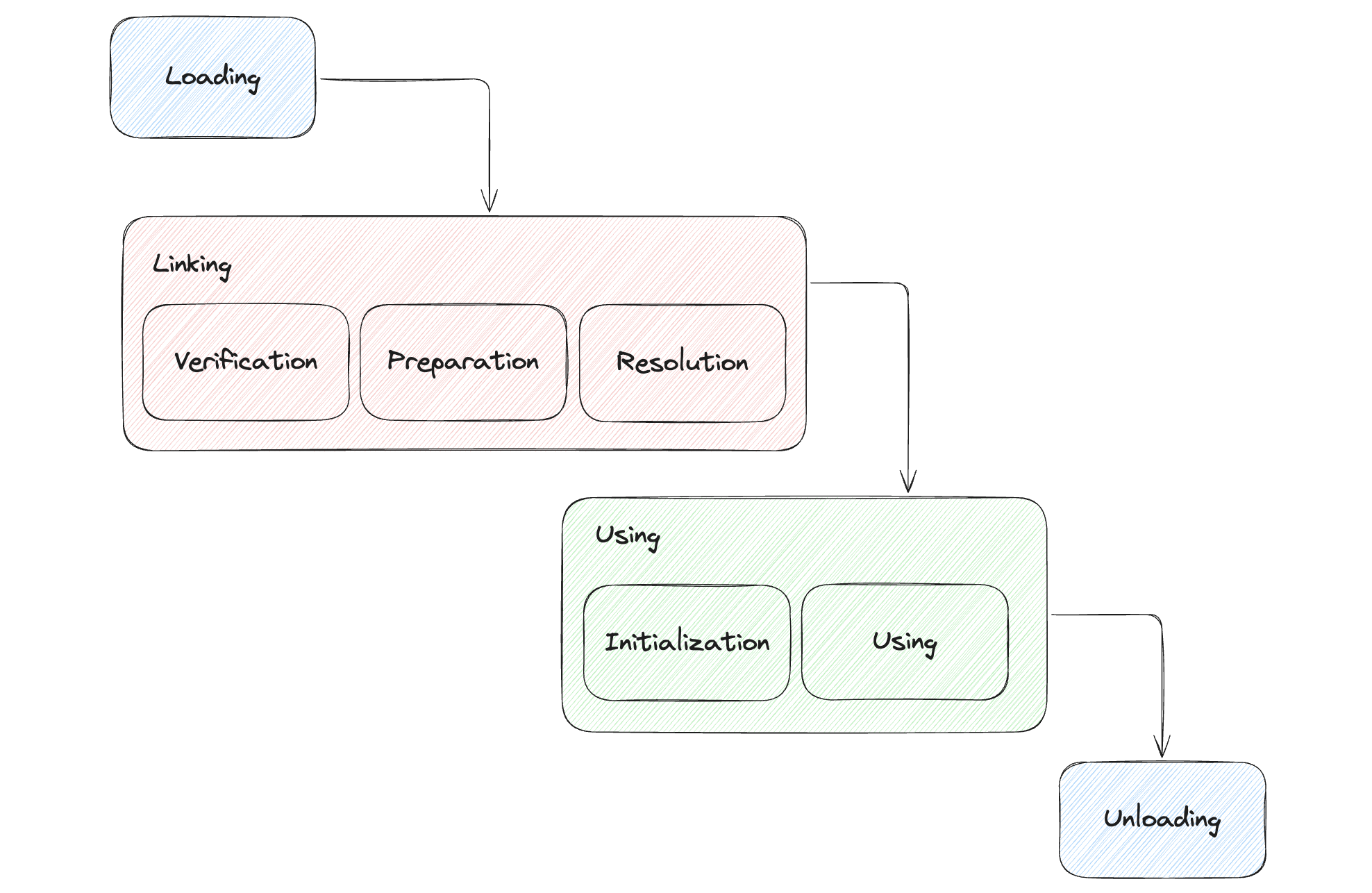
1. Loading
- The ClassLoader reads the class bytecode into memory.
- Parses class metadata (name, superclass, interfaces, methods, fields).
- Stores metadata in the JVM Method Area.
- Creates a corresponding
java.lang.Classinstance in heap memory. - Classes are loaded dynamically, triggered upon their first usage (object instantiation, static method invocation, or static field access).
2. Linking
This prepares a loaded class for execution, divided into three sub-steps:
- Verification:
- Ensures bytecode integrity, adherence to JVM specifications.
- Checks class structure, inheritance rules, interface implementation, bytecode validity, and symbolic reference correctness.
- Preparation:
- Allocates memory for static fields and assigns default values (e.g., numeric fields to
0, object references tonull).
- Allocates memory for static fields and assigns default values (e.g., numeric fields to
- Resolution:
- Converts symbolic references into direct memory addresses or offsets.
- JVM implementations can perform resolution eagerly (at link-time) or lazily (upon first reference).
3. Initialization
This is the final phase of class loading. During initialization:
- Static variables are assigned their actual values as defined in the code (e.g.,
static int count = 100;would setcountto100, overriding the default0from the preparation phase). - Static initialization blocks (if any) are executed.
This process is triggered only when the class is actively used for the first time (e.g., an instance is created, a static method is called, or a static field is accessed that is not a compile-time constant). The JVM ensures that initialization is done in a thread-safe manner.
Dynamic Class Loading and Binding in Java
Java's dynamic loading and binding capabilities provide substantial flexibility:
Dynamic Loading
Java loads classes at runtime, only when needed. You can explicitly load classes via:
Class<?> clazz = Class.forName("com.example.MyClass");
if (someCondition) {
    try {
        Class<?> clazz = Class.forName("com.example.MyClass");
        Object instance = clazz.getDeclaredConstructor().newInstance();
        // use instance
    } catch (Exception e) {
        e.printStackTrace();
    }
}
Dynamic Binding (Late Binding)
JVM determines the exact method to invoke at runtime.
Essential for polymorphism:
class Animal {
    void sound() { System.out.println("Animal makes a sound"); }
}

class Dog extends Animal {
    @Override
    void sound() { System.out.println("Dog barks"); }
}

public class DynamicBindingExample {
    public static void main(String[] args) {
        Animal animal = new Dog();
        animal.sound();  // Outputs: "Dog barks"
    }
}
Pros and Cons of Java's Dynamic Features
- Performance Cost: Runtime loading, verification, and binding introduce slight overhead.
- Enhanced Flexibility: Enables runtime decisions, dynamic plugins, and extensible designs without recompilation.
Interface-Driven Runtime Decisions
Using interfaces allows runtime determination of implementations:
public interface PaymentService { void pay(); }

public class CreditCardPayment implements PaymentService {
    public void pay() { System.out.println("Paying with Credit Card"); }
}

public class PayPalPayment implements PaymentService {
    public void pay() { System.out.println("Paying with PayPal"); }
}

public class PaymentProcessor {
    public static void main(String[] args) throws Exception {
        String paymentType = "CreditCardPayment"; // This could come from config or user input
        PaymentService paymentService = (PaymentService)
            Class.forName("com.example." + paymentType)
                 .getDeclaredConstructor().newInstance();

        paymentService.pay();  // "Paying with Credit Card"
    }
}
Java Object Layout and JOL
Java Object Layout (JOL) helps developers understand object memory structures:
- Object Header: Metadata (hash code, garbage collection info, lock states).
- Instance Fields: Object's actual data.
- Padding: Ensures memory alignment (typically multiples of 8 bytes).
Using JOL Library
You can use the JOL library to inspect these details. Add the dependency:
dependencies {
    implementation 'org.openjdk.jol:jol-core:0.16'
}
Then, observe the layout:
import org.openjdk.jol.info.ClassLayout;

class SimpleObject {
    int intField;
    long longField;
    byte byteField;
    Object refField;
}

public class JolTest {
    public static void main(String[] args) {
        SimpleObject obj = new SimpleObject();

        System.out.println("Before hashCode():");
        System.out.println(ClassLayout.parseInstance(obj).toPrintable());

        // Calling hashCode() can trigger its computation and storage in the Mark Word
        obj.hashCode();

        System.out.println("After hashCode():");
        System.out.println(ClassLayout.parseInstance(obj).toPrintable());
    }
}
Running this code will show the internal layout of SimpleObject. The output before and after calling obj.hashCode() might reveal changes in the object's Mark Word, as the hash code, if not already computed, gets stored there.
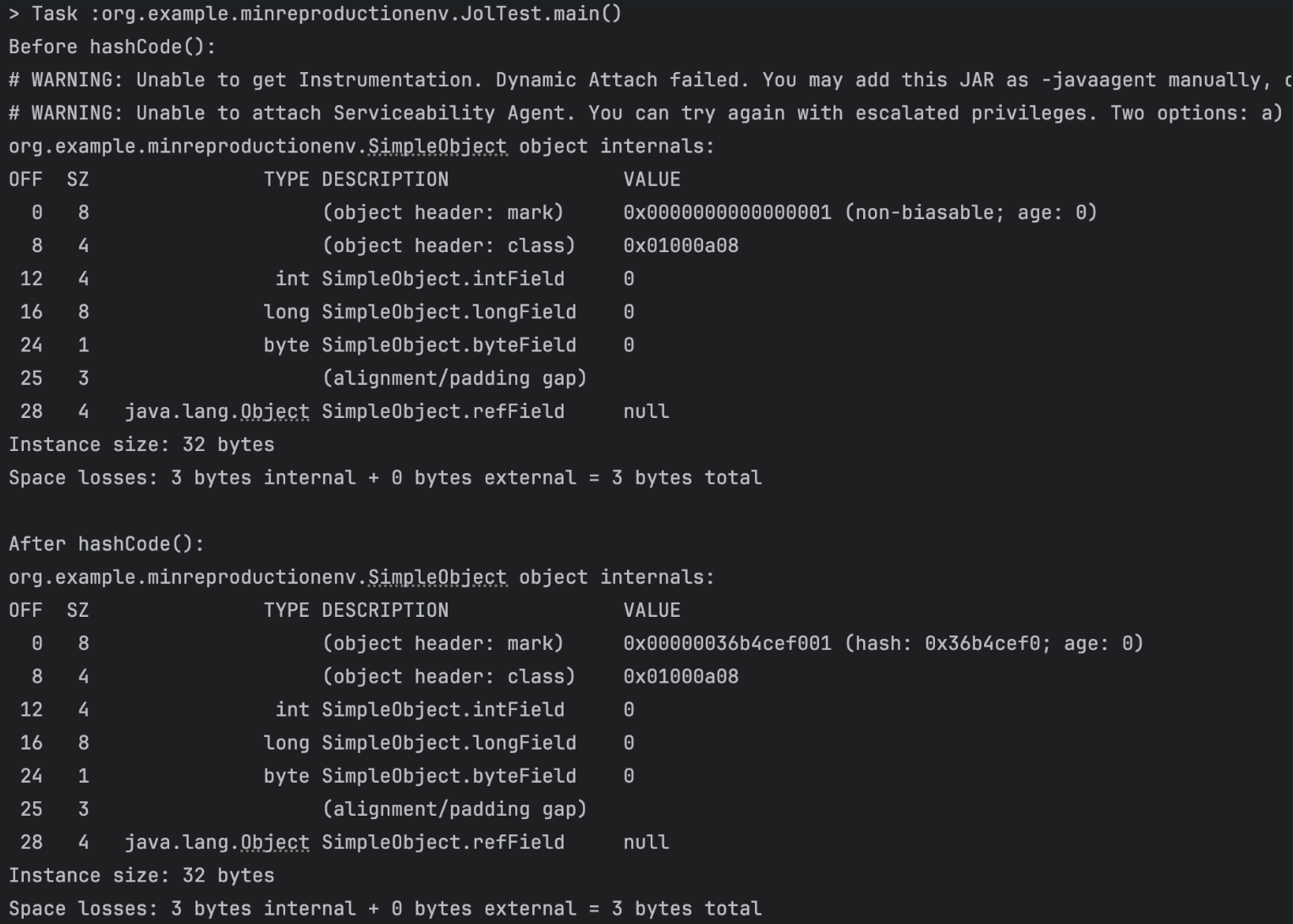
Object Header
- Mark Word: Stores hash codes, GC status (age bits), synchronization states (lock information). Its structure can change depending on the object's state.
- Class Pointer (Klass Pointer): References class metadata in the Method Area, linking the object instance to its class definition.
Conclusion
Java's ClassLoader and dynamic class loading system enable JVM's platform-independent and extensible runtime environment. By loading, verifying, initializing, and binding classes on-demand, Java strikes a balance between performance and flexibility, making it ideal for complex, secure applications. A deep understanding of these internals transforms your role from a Java developer into a confident operator of the JVM.